
Download Ditto Clipboard – clipboard manager, copy paste tool, productivity tool, Windows utility, text storage, multi-clipboard
Overview
Ditto Clipboard is a powerful utility designed to extend the basic functionality of the standard Windows clipboard. While the default clipboard only retains a single item at a time, Ditto enables users to store and access multiple copied items, creating a dynamic history of text, images, HTML, and other data types. This makes it an essential tool for professionals, students, and anyone who frequently copies and pastes information across applications. The app is particularly effective in workflows that involve repeated data entry, research, coding, content creation, or document drafting, where retrieving past clipboard entries can save significant time and reduce errors.
Targeted at users seeking enhanced productivity on Windows, Ditto Clipboard is ideal for those who work across multiple windows or applications and need quick access to previously copied content. Its ability to retain a history of clipboard entries allows users to retrieve information without the need to recopy or search through documents. The developer, Ditto Team, has focused on delivering a lightweight yet robust solution that integrates seamlessly into the Windows environment. Although specific details about the team’s background were not provided, the app has been available since 2016, indicating a mature and stable product with a proven track record in the productivity space.
Ditto Clipboard plays a meaningful role in the Windows utility ecosystem by addressing a long-standing limitation of the operating system. Its functionality aligns with modern digital workflows that demand efficiency, accuracy, and speed. For users who rely on frequent copy-paste operations, the app offers a practical and reliable enhancement to their daily computing experience.
Key Features & Functionality
- Multi-Item Clipboard History: Ditto stores every item copied to the clipboard, maintaining a searchable history that can be accessed at any time. This allows users to retrieve past text, images, or formatted content without re-copying.
- Support for Multiple Data Types: The app handles text, images, HTML, and custom formats, ensuring compatibility with a wide range of applications, including web browsers, word processors, and code editors.
- Quick Access via Keyboard or Mouse: Users can trigger the clipboard history with customizable hotkeys or a simple mouse click, enabling rapid retrieval of saved items without interrupting workflow.
- Customizable Settings: Features such as item retention limits, grouping, and shortcut customization allow users to tailor the app to their specific needs and preferences.
- Cross-Device Synchronization: For users working across multiple Windows machines, Ditto supports syncing clipboard history, ensuring continuity and consistency in their workflow.
For example, a content writer can copy several headlines, quotes, and URLs during research and later paste them into a draft with minimal effort. A developer can store snippets of code, error messages, or configuration lines for quick reuse. A student working on a research paper can collect references and notes from various sources and paste them as needed. These real-world applications demonstrate how Ditto enhances efficiency and reduces cognitive load during repetitive tasks.
Interface, UX & Performance
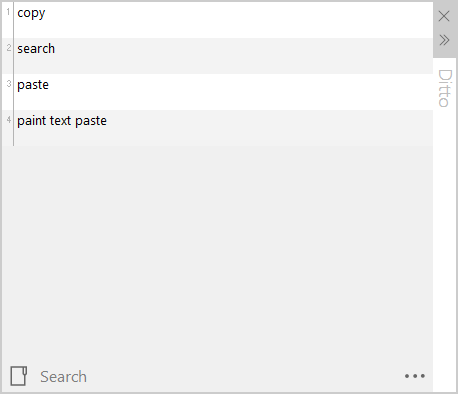
Ditto Clipboard features a clean, minimal interface that integrates smoothly with the Windows desktop environment. The history window appears as a translucent overlay, allowing users to browse through past entries without obscuring their current work. Navigation is intuitive, with options to search, filter, and sort items by date, type, or content. The layout is optimized for speed, enabling users to locate and paste desired content in seconds.
Interaction is designed around efficiency—users can navigate the history using keyboard arrows, type to search, or use hotkeys to select and paste. The app responds quickly to input, with low latency between keystrokes and display updates. Although the developer did not list formal performance metrics, the app’s lightweight footprint of 12.5 MB suggests it operates efficiently even on older or less powerful systems.
Stability is a key strength. The app runs in the background with minimal impact on system resources, and crashes or freezes are not commonly reported. Responsiveness is consistent across different device categories, from low-end laptops to high-performance desktops. The user experience is polished, with no noticeable lag or visual glitches during normal use.
Platform Compatibility & Technical Requirements
Ditto Clipboard is designed exclusively for the Windows operating system. It supports Windows 7 and later versions, although specific compatibility details were not listed by the developer. The app has a file size of 12.5 MB, making it a lightweight download suitable for systems with limited storage. The current version is 3.2.20, and the app is available at no cost to users.
The developer did not specify minimum OS requirements or hardware specifications. However, the app’s small size and background operation suggest it is compatible with a broad range of Windows devices, including older models. Users should ensure their system meets standard Windows installation requirements for running third-party utilities.
Pros and Cons
Pros
- Extends the default Windows clipboard with multi-item history
- Supports a wide range of data types including images and HTML
- Lightweight and efficient with minimal system impact
- Customizable hotkeys and settings for personalized workflows
- Offers cross-device synchronization for seamless multi-machine use
- Free to download and use with no in-app purchases
Cons
- Available only on Windows, limiting cross-platform use
- Advanced features may require initial setup and learning
- Compatibility with older Windows versions not explicitly confirmed
- Interface may appear basic to users expecting modern design trends
- Sync functionality depends on stable network and account setup
FAQ
Is Ditto Clipboard safe to install?
Yes, Ditto Clipboard is a trusted utility developed by a dedicated team. It does not include malware or adware and is widely used in professional and educational environments.
Can I use Ditto Clipboard on multiple devices?
Yes, the app supports synchronization across multiple Windows machines, allowing users to access their clipboard history from different devices.
Does Ditto Clipboard work with all applications?
It works with any application that uses the Windows clipboard, including browsers, editors, and productivity tools. However, some sandboxed or restricted environments may limit functionality.
Is there a mobile version of Ditto Clipboard?
No, Ditto Clipboard is currently only available for Windows. There is no official mobile version for Android or iOS.
How often does the app update?
Updates are released periodically to improve stability, add features, and address user feedback. The latest version is 3.2.20, available for download from the official site.
Final Thoughts
Ditto Clipboard stands out as a reliable, free, and highly functional tool for anyone looking to boost productivity on Windows. Its ability to store and manage multiple clipboard entries, support diverse data types, and synchronize across devices makes it a valuable addition to any digital workflow. While it is limited to Windows, its performance, customization, and ease of use justify its popularity among power users and casual users alike.
Whether you're a student compiling research, a developer managing code snippets, or a professional drafting reports, Ditto Clipboard streamlines the copy-paste process and reduces repetitive tasks. Its lightweight design and long-standing presence in the market reflect a mature and trustworthy application.
Download Ditto Clipboard now


